Wix Studio Two Is Here. Should You Use It Yet?


Wix now offers a professional editor that lets you work with AI, move elements by hand, and edit React code. You can also export a Studio Two site, work on it elsewhere, and bring changes back.
That is a meaningful change if you have ever wanted Wix's visual editor alongside tools such as Claude, Codex, or Cursor. Wix announced Studio Two on November 2, 2026, with access rolling out to Partners first.
The decision gets more interesting when you read the developer docs. An exported site still has dependencies on Wix. Some features work inside Studio Two but are not supported in the export. Existing Velo work also needs a closer look.
My recommendation: consider Studio Two for a new project after checking its requirements. Keep a working site where it is until a specific benefit justifies moving it. This guide shows you what to check, how to start, and how to judge the result beyond the first attractive homepage.
Three details to know before you start
Existing Wix Studio sites remain supported during the rollout.
Export is in beta. Exported member login and dynamic pages have important restrictions.
Importing an exported project can overwrite newer editor changes.
Sources: launch announcement, export limitations, and import rules.
What is Wix Studio Two?
Studio Two is a separate editor from Wix Studio, built on the same underlying architecture as Wix Harmony. Harmony is aimed at people building their own sites. Studio Two adds professional editing and a code environment. Wix explains the architecture here.
Its main appeal is the ability to choose how you work at each point in a project:
Ask Aria 2.0: generate or change a design, create a component, or work with code and data.
Edit visually: adjust the layout, spacing, styles, and individual elements on the canvas.
Work in code: use React and the browser-based Visual Studio Code environment for custom work.
Wix also lists variables, site styles, advanced animations, and automatic responsiveness among the changes. Those features are documented in its product introduction.
Here is a hypothetical example. A software company needs a pricing calculator. A developer could build the calculator as a custom component, while a designer handles the page around it visually. The question to test is whether the marketing team can later change the heading and button without needing another code change.
That handoff matters more to me than how quickly the first page appears.

What does “export your site” actually mean?
Start with three separate questions: Can you get the code? Can you run the website elsewhere? Can the whole business operate without Wix?
The answers are different.
Wix documents a runnable React export that you can edit and host outside Wix. Its hosting guide says the build runs as a Node.js server. The running site still loads fonts and media from Wix and calls Wix APIs for business features. Read the external hosting requirements.
In plain English, you can move where the website's pages run while retaining Wix services behind them. Exporting a shop's pages does not, by itself, move its order system into your own database.
Check the destination, not just the editor
Question | Current documented position |
Can I export React code? | Yes, through the beta export feature. |
Can I export a site with dynamic pages? | Wix currently says a site with dynamic pages cannot be exported. |
Can visitors sign in on the exported site? | Member login is currently unsupported. |
Will every installed app widget run? | Non-ERC widgets from installed apps can fail the preview and build. ERC means Editor React Component. |
Do all popups and tracking scripts carry over? | Exported lightboxes do not appear on the running site. Custom code that requires visitor consent does not load. |
Source: Wix's export guide and current limitations. These are export restrictions, not a list of everything Studio Two itself lacks.
Wix's Help Center also excludes Multilingual, SEO data, embedded scripts, local app installation, and the site's backend from supported export coverage. Its developer docs describe exported code packages too. Do not read that as a promise that the hosted backend and all its services move with the files.
For a client who requires complete independence from Wix, ask for a dependency review before agreeing on the platform. A successful export is only one part of that review.
If you manage the marketing, save a short reference sheet before an external move: important URLs, page titles, descriptions, canonical URLs, redirects, structured data, and conversion events. Compare those with the deployed pages and test tracking with the intended consent settings. An export that looks right still needs this review.
What happens to your existing Wix Studio or Velo site?
Wix says existing Studio sites remain supported and Partners can keep creating in both editors during the rollout. There is no reason in that announcement to rebuild a working site simply because Studio Two has launched.
The bigger question is what your current site does behind its pages.
Start a migration review with these dependencies
Your site uses | What to check in Studio Two |
Velo page code using $w | There is no $w API. Custom UI uses React components and a different connection model. |
Incoming webhooks through HTTP functions | The documented HTTP endpoints serve the site's own frontend. External systems cannot call them as Velo HTTP functions. |
Scheduled jobs or custom routers | These are not in the initial release. |
Data hooks that validate a submission | Data events are a partial alternative. They run after saving, so they cannot block an invalid save. |
Datasets connected to CMS content | The new model uses CMS Data Sources. Check the read and write behavior your workflow needs. |
Source: Wix's developer comparison, updated November 10. See also its overview of supported backend, CMS, and business features.
For example, imagine a form that must reject a duplicate application before it is saved. Moving the check to an event that runs afterward changes the business rule. The page could look identical while the workflow behaves differently.
Apps deserve their own check. Wix says Blocks site widgets and site plugins do not work in Harmony or Studio Two. Dashboard-only Blocks extensions can work. Ask the app developer about the particular extension your site uses rather than assuming every Wix app is affected equally. See Wix's compatibility table.
Be careful with Harmony migration claims
Wix's launch material describes opening Harmony work in Studio Two. However, the Help Center page checked for this article still labels that route “Coming Soon”.
I would verify it in the actual account before promising a migration date. A feature in a launch demonstration and a feature enabled for your client are two different milestones.
How to start a useful Studio Two project
When access reaches your account, Wix documents this starting route: Create New Site → Wix Studio Two Editor → AI Prompt. You can add media, design references, business documents, and reusable instructions.
Turn on Plan Mode if you want to review the brief before generation. Wix says it is off by default. With it enabled, Aria helps build the brief, then offers three homepage directions. You choose a direction and continue in the editor. Follow Wix's site creation guide.
My advice is to give Aria the decisions a real designer would need. Explain who the buyer is, what they should do next, what evidence you can use, and which functions must work.
Example brief for a fictional software company
Build a website for onboarding software used by small customer success teams. The main action is to book a demo. Use the attached logo, product screenshots, and approved feature list. Include a homepage, product page, pricing page, and demo page. Do not invent customer logos, reviews, results, or prices. Flag missing information for me. Show me the page plan before generating the site.
This brief gives you something to check. Does the homepage explain the product? Is the demo link working? Are all claims supported by the supplied material? A vague request for a beautiful website gives you far less to judge.
Save standards, then review whether Aria follows them
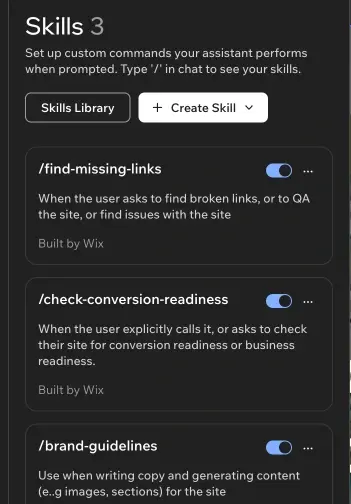
Aria's Skills feature stores reusable instructions. You can call a skill with a slash in the chat. Wix's guide says you can attach one skill at a time, so combine related instructions when a task needs them together. Shared skills also have access settings. Keep each client's facts clearly separated from general agency standards. See the Skills instructions and limits.
Useful standards might include: use only approved proof, name buttons by their action, keep one primary action per page, and flag missing product information. A saved instruction should still be checked against the finished page.
Review mobile after the desktop design is approved
One easy detail to miss: Wix says Aria works on the desktop breakpoint and cannot change the mobile or tablet design. Auto Mobile arranges the mobile layout, and you can adjust it yourself. Source: the site creation FAQ.
Wix also documents a useful behavior: manually changing a section's mobile layout disables Auto Mobile for that section. It can be re-enabled later. Read the responsive settings guide.
Check long headings, pricing rows, navigation, button order, and forms on a phone. For the fictional software company above, a neat desktop comparison table is not enough if a mobile visitor cannot find the demo button.

The first test I would run is a handoff
A launch demo shows what the person running it can build. A client project also needs to survive the next person's changes.
Here is a suggested acceptance test. It is a test plan, not a report of results we have measured.
Build one complete buyer journey. Use approved copy and a real destination for the main button. Check what happens after the click.
Ask the future owner to make an ordinary edit. Change a headline, replace an image, and update a button. Note anything that requires developer help.
Check the changed page on mobile. Include the longest heading and any custom component.
If export matters, test it on a non-production site. Export, make one small external change, check it, and import it back. Review the result before publishing.
Record what still needs Wix or a developer. Put those dependencies in the handover and the ongoing cost estimate.
For the external step, Wix supplies instructions for coding agents and a lint check that checks the import rules. Its guide says passing lint makes a successful import likely; the import remains the final check. A code check also does not prove that a booking or checkout journey works. See the external editing workflow.
Agree who can edit during an export
Wix says importing replaces the site with the exported version. It can delete pages absent from that version and overwrite changes made in Studio Two after the export. Importing does not publish the site. Read the import warning before using this workflow.
Imagine a developer exporting on Monday while a marketer adds a page on Tuesday. If the developer imports Monday's project on Wednesday, that new page may be removed. This is an illustrative example of the documented behavior.
Agree an editing window, keep a record of the current version, and review the page list after import. Once the editor work is current, take a fresh export before another external round.
What are early users and agencies saying?
The public material reviewed here is a small sample of agency and developer commentary, not a survey of Wix users. Some authors sell Wix services, so their enthusiasm should be read in that context.
Vision Marketing's launch write-up highlights a practical attraction: bringing work from coding tools into an editor a designer can use. It also recommends checking feature availability, AI mistakes, and existing integrations before moving client work.
Parnii's guide follows both the design features and their release status. The agency says it will test features as access reaches its account. That is a useful distinction between documenting an announcement and reporting daily production experience.
My reading is that the opportunity is credible, while claims about time saved still need project evidence. I would measure time spent on revisions, mobile fixes, integrations, and handover before saying Studio Two makes delivery faster or cheaper.
What should you budget for?
Before budgeting, check the current Wix Studio plans and the price shown in your account. Confirm what your selected plan includes, whether required apps cost extra, and which AI usage limits apply.
Build the estimate around the job rather than the first generated design:
Platform costs: the selected site plan, required apps, and any applicable AI usage charges or limits you confirm.
Implementation: content, custom functions, integrations, mobile work, and testing.
If you host externally: hosting, deployment, monitoring, and the Wix services the site still uses.
If you move an existing site: rebuilding incompatible features, checking URLs and metadata, and validating measurement.
An agency quote should say which costs are recurring and who maintains each part. AI generation can make a draft inexpensive while the business workflow still needs substantial work.
Should your next website use Studio Two?
These are my recommendations based on the documented capabilities and limits above.
Choose by the project's hardest requirement
Your situation | My recommendation |
A new marketing site with a clear brief | Consider a Studio Two pilot. Test the main action, mobile layout, and owner edits. |
A working Studio site with custom Velo workflows | Keep it running. Map the custom functions before deciding whether to rebuild. |
A shop or booking site | Evaluate the exact purchase or booking journey, required apps, and ongoing administration before committing. |
A site that must run outside Wix | Check every required feature against the export limits, then prove the exported journey. |
A membership site or dynamic directory that must be exported | The current export restrictions conflict with those requirements. Resolve that before choosing this route. |
A client who started in Harmony | Check whether the conversion route is enabled in their account before scheduling the move. |
The feature I would pay closest attention to is whether another person can take over the work comfortably. Ask the designer to change the layout. Ask the marketer to update the message. Ask the developer to extend the custom component. Then follow the buyer's journey through to its end.
If those tasks work well for your project, you have a useful reason to choose Studio Two.
For a new build or a move from an existing site, send Wix Patriots the current site and the functions it must keep. That is enough to start a practical discussion about the right editor.
How this guide was researched
This guide was researched on November 12, 2026, using Wix's launch material, Help Center, developer documentation, and the two named agency write-ups. This is a documented launch analysis, not a hands-on performance review. The examples and acceptance test are proposed, not completed client projects. Interface images are credited Wix Help Center screenshots. Beta limits and rollout availability should be rechecked when a project starts.